Home Screen
Your Daily Mental Reset
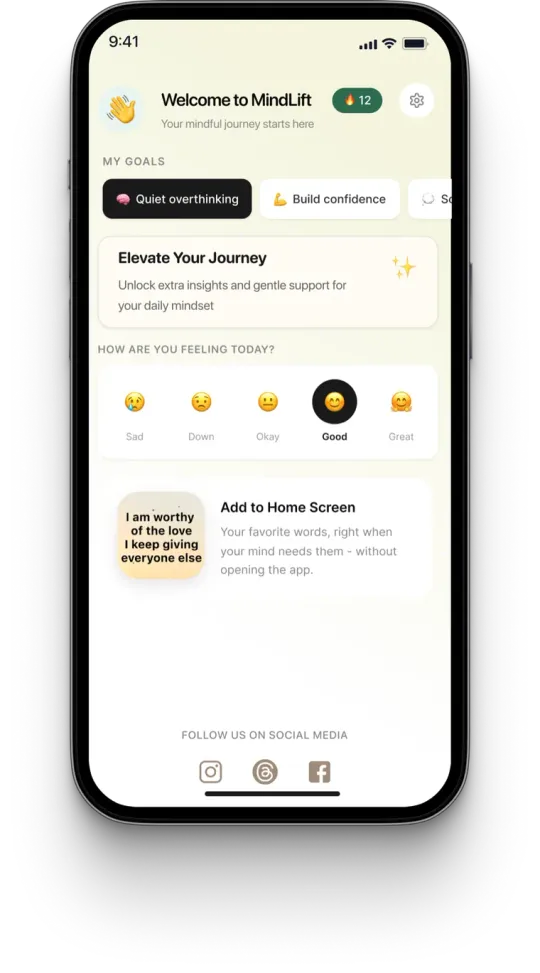
The Home Screen is the heart of MindLift. It's designed to give you quick, personalized support whenever you need it — whether you're starting your day, navigating a stressful moment, or simply looking for a healthier perspective.
Every time you open MindLift, the Home Screen adapts to your selected goal and shows content that supports what you're working on right now.
What You'll Find on the Home Screen
Personalized Affirmations
The affirmations shown on your Home Screen are personalized based on your selected goal. The goal is not to flood you with positivity — it's to help you practice thoughts that feel realistic, supportive, and helpful.
Daily Inspiration
You'll receive fresh content designed to support your mindset journey. These small reminders help reinforce healthier thought patterns and encourage consistent practice.
Quick Access to Reframe
Sometimes an affirmation isn't enough — because you're struggling with a very specific thought. The Home Screen gives you immediate access to Reframe so you can work directly with the thought that's stuck.
Recommended Content
Based on your selected goal, MindLift may recommend additional affirmations, audio content, or exercises that are most relevant to your current needs.
Affirmation Examples by Goal
"Not every thought needs solving."
"I can let uncertainty exist without chasing it."
"I trust myself more than I used to."
"I can handle challenges one step at a time."
"I can speak to myself with kindness."
"Progress matters more than perfection."
"I did my best with what I knew then."
"I deserve the same compassion I give others."
How to Use the Home Screen
Most people open a mindset app and immediately start scrolling. MindLift works differently. The best results come from slowing down.
Check In With Yourself
Before reading anything, pause for a moment. Ask: "How am I feeling right now?" You don't need a perfect answer — just notice what's present. Maybe you're overthinking, anxious, or self-critical. Awareness is the first step.
Read One Affirmation Slowly
Choose one affirmation. Not ten. Just one. Read it slowly, then read it again. Ask: "Does this feel slightly more helpful than the thought I had before?" Small shifts matter.
Don't Force Yourself to Believe It
Affirmations don't require total belief. Instead of "Do I believe this 100%?" ask "Can I believe this a little more than my current thought?" A believable thought is more powerful than an unrealistic one.
Save the Ones That Resonate
When an affirmation feels meaningful, tap the ❤️ icon. Saved affirmations become your Favorites collection — a personal mental toolkit you can return to anytime.
Use Reframe When You're Stuck
If a thought keeps repeating, open Reframe from the Home Screen. Type the exact thought and get a CBT-based alternative in about 60 seconds.
Reframe Examples
"Everyone thinks I'm awkward."
I don't actually know what others think, and one conversation doesn't define me.
"I'm going to mess this up."
I'm nervous because this matters to me, and I can handle it one step at a time.
When to Use the Home Screen
The Home Screen is designed for everyday life.
How the Home Screen Helps Create Results
MindLift isn't designed to create overnight transformation. Instead, it helps you build healthier thinking patterns through repetition.
Every time you:
…you're practicing a different response to your thoughts.
Over time, the practice is designed to build toward less overthinking, reduced self-criticism, increased confidence, greater emotional awareness, more self-compassion, and improved resilience. The biggest changes often begin with the smallest shifts.
A Simple Home Screen Routine
Remember
The Home Screen isn't meant to be endlessly scrolled. It's meant to be used intentionally.
One helpful thought. One small perspective shift. One moment of self-compassion. Those moments add up.
Don't spiral in your thoughts. Respond to them.