How to Use Reframe — Turn Negative Thoughts

Learn how to use MindLift's Reframe feature. Write any thought — negative, anxious, or positive — and get a balanced, CBT-backed perspective in seconds.

HomeUser GuideMini-Reframe
User Guide — Mini-Reframe

How to Use Reframe: Turn Any Thought Into a Helpful Perspective

Reframe is where you bring a thought — any thought — and get a more balanced, supportive perspective. Not toxic positivity. Not pretending things are fine. Just a clearer, kinder way of looking at the same situation.

What Is Reframe?

Reframe is an interactive feature inside MindLift where you write any thought — a worry, a self-criticism, a feeling, or even a win — and receive a perspective that helps you move forward. Think of it as a conversation with a wiser, kinder version of yourself.

The goal is not to make you feel artificially positive. The goal is to help you see what's actually true, rather than what anxiety, self-criticism, or overthinking insists is true.
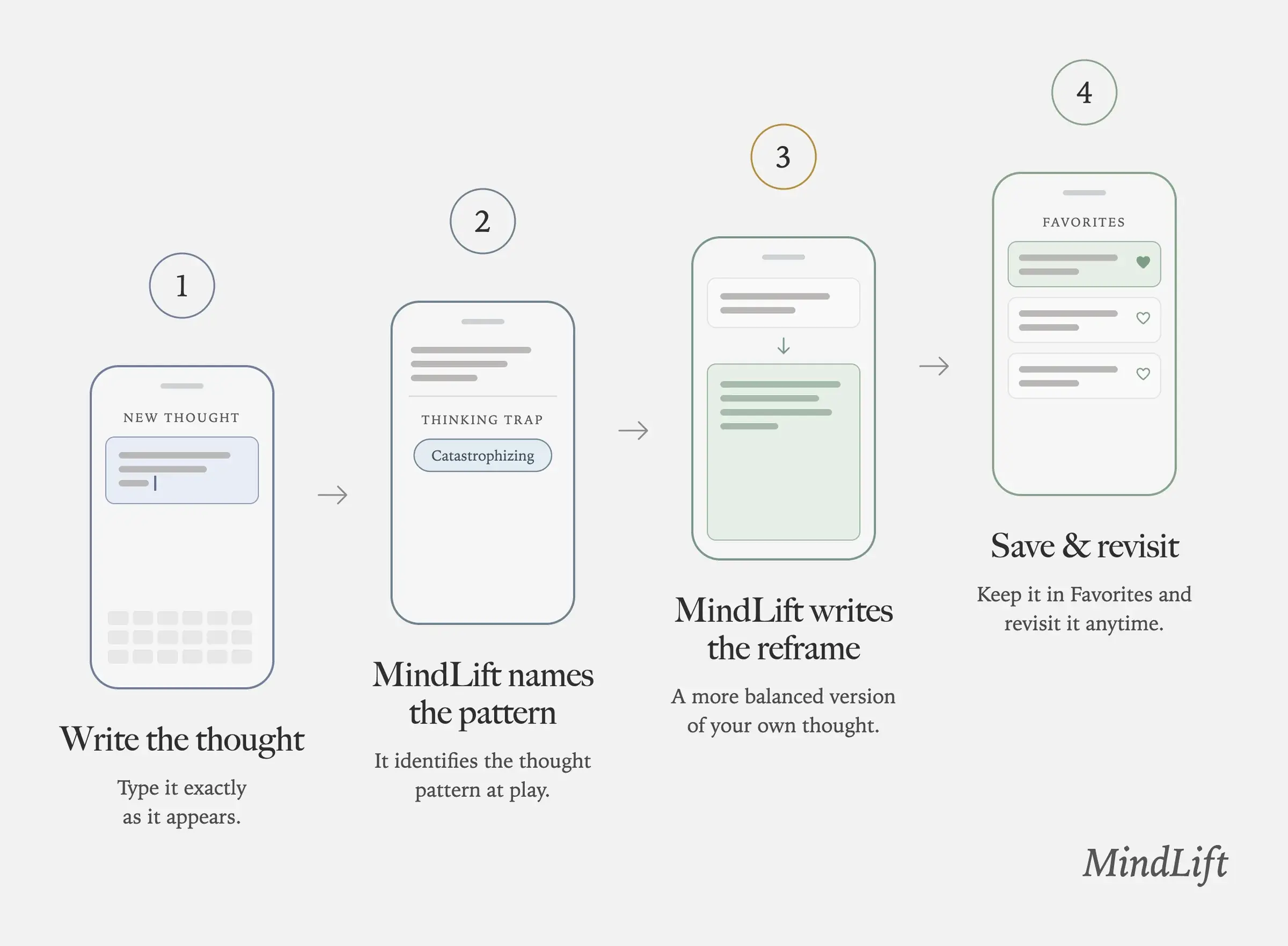
Four phone wireframes on a light grey background, numbered 1 to 4 and joined by arrows. 1, Write the thought: a New Thought screen with a text box and keyboard. 2, MindLift names the pattern: a Thinking Trap label with one chip reading Catastrophizing. 3, MindLift writes the reframe: the thought, a down arrow, then a green reframe card; its number circle is gold. 4, Save & revisit: a Favorites list with heart icons. MindLift wordmark bottom right.
MindLift's reframe flow in four steps: you type the thought exactly as it appears, MindLift names the thinking pattern at play, it writes a more balanced version of your own thought, and you can save that reframe to Favorites and revisit it anytime.

What Can I Write?

Almost anything that's on your mind. Reframe isn't only for negative thoughts — it also strengthens positive ones.

Difficult thoughts
"I'm going to fail."
"I always mess things up."
"I'm not good enough."
Worries
"I'm worried about tomorrow."
"What if I make the wrong decision?"
"I can't stop thinking about what happened."
Feelings
"I feel anxious."
"I feel guilty."
"I feel behind in life."
Positive moments
"I handled that meeting really well."
"I stayed calm today."
"I finally did something I've been avoiding."

When to Use Reframe

The best moment to use Reframe is when the thought is happening — not hours later.

🌀During overthinking spirals
📋Before meetings or interviews
😬After making a mistake
😰During social anxiety
📊When comparing yourself to others
🌙Before bed to clear your mind
💬After a difficult conversation
⭐When feeling proud of a win
💪When building confidence

How to Use Reframe — Step by Step

1
Open MindLift
Launch the app.
2
Open the Reframe Screen
Tap on the Reframe tab or open it from the Home Screen.
3
Write What's on Your Mind
Type the thought exactly as it appears. Don't try to make it sound better. Don't edit it. Don't judge it. Just write it. The more honest you are, the more helpful the response will be.
4
Generate Your Reframe
Tap to generate. MindLift creates a more balanced perspective designed to help you move forward.
5
Read Slowly
Take your time. Read the response once, then read it again. Ask yourself: 'Does this feel slightly more helpful than my original thought?' You don't need to completely believe it. Even a small shift matters.
6
Save It
If the response resonates, save it. Saved reframes become part of your Favorites and can be revisited anytime — or displayed on your Home Screen widget.

Try Reframe Right Now

Pick a starter prompt or write your own. This works the same as the Reframe feature inside the app.

Try Reframe — write any thought below

Reframe Isn't Just for Difficult Moments

Most people assume Reframe is only for negative thoughts. But it can also help you notice and strengthen positive patterns — which is one of the most overlooked ways to use it.

Celebrate wins
"I handled that difficult conversation well."
"I stayed calm under pressure."
Build confidence
"I actually handled that meeting pretty well."
"I showed up when I wanted to hide."
Reinforce growth
"I paused before reacting today."
"I didn't overthink as much as usual."

A Simple Daily Reframe Routine

Consistency matters more than duration. Even one reframe a day creates real change over time.

☀️
Morning
"What thought might get in my way today?" — Reframe it before the day starts.
~1 min
⚡
During the day
The moment a stressful thought appears, open Reframe immediately — not later.
~60 sec
🌙
Evening
"What's one thing I handled well?" or "What thought do I want to leave behind?" — Reframe and save it.
~1 min

What to Expect With Regular Use

The goal isn't to eliminate negative thoughts. It's to change your relationship with them.

✅ Less overthinking
✅ Reduced self-criticism
✅ More confidence
✅ Greater self-awareness
✅ Better emotional regulation
✅ Increased self-compassion
✅ Faster recovery from difficult moments
✅ Greater ability to recognize progress
Your first thought isn't always your best thought.

Many thoughts are automatic — shaped by fear, old habits, or assumptions. Reframe helps you pause, step back, and choose a more helpful perspective. Open the Reframe screen. Write the thought. Read the response. Save what helps. Repeat often. Over time, you're not just changing individual thoughts — you're building a healthier way of talking to yourself.

Common questions

Frequently asked questions

What is the Mini-Reframe in MindLift?

The Mini-Reframe is an interactive feature where you write any thought — a worry, a self-criticism, a feeling, or even a win — and receive a more balanced, supportive perspective on it. It is grounded in cognitive behavioral therapy (CBT) and works in about 60 seconds. It is not toxic positivity and not pretending things are fine; it is a clearer, kinder way of looking at the same situation, in your own words.

How do I use Reframe to change a negative thought?

Open Reframe, type the thought that is bothering you exactly as it sounds in your head, and submit it. MindLift responds with a perspective that helps you see what is actually true rather than what anxiety, self-criticism, or overthinking insists is true. The goal is not to feel artificially positive but to move forward with a more grounded view. The whole exchange takes about a minute.

Is the Mini-Reframe a replacement for therapy?

No. The Mini-Reframe is a self-reflection and reframing tool that uses CBT principles, not a substitute for professional care. It is useful for everyday harsh self-talk and 2am thought spirals. If you are dealing with something serious, please reach out to a qualified mental health professional. MindLift is free to start, with no ads; premium is available.